Virtual Event Production Guide: From Planning to Execution
April 23, 2026
Virtual events have become a standard part of corporate communication, marketing, and audience engagement. Whether you're hosting a webinar for 50 people, a multi-day conference with thousands, or a product launch aimed at remote audiences, the difference between a seamless experience and a technical disaster often comes down to professional virtual event production.
This guide covers what you need to know about virtual event production, from foundational technology and planning through the execution practices that keep your audience engaged from start to finish.
What Virtual Event Production Really Involves
Virtual event production has a lot more moving parts than most people realize. Professional virtual event production brings together three distinct disciplines that must work in sync.
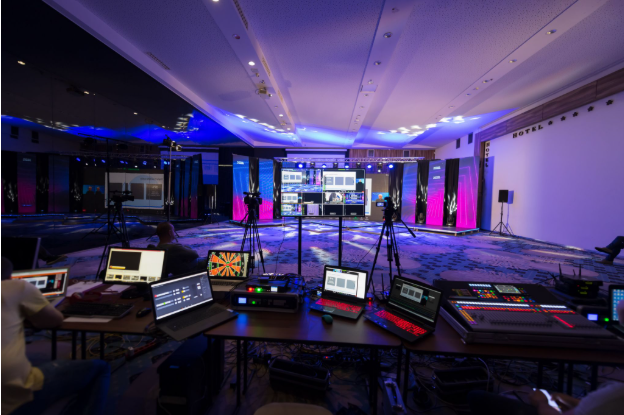
The first is audio-visual (AV) production, which handles the technical backbone of the event. This includes camera work, lighting, audio mixing, graphics, and real-time technical management. Professional AV makes sure your speakers are visible, audio is clear and balanced, and visuals support your message rather than distract from it.
The second is content production, which covers the creative and editorial work. This involves scripting, shooting video content before the event, creating animations or motion graphics, designing on-screen elements, and producing any pre-recorded segments that play during your live event.
The third is broadcasting and streaming, which handles distribution. This means encoding your content for multiple platforms at once, managing live chat and audience interactions, recording for on-demand viewing, and troubleshooting technical issues in real time. When these three elements work together, audiences experience an event that feels polished and well-organized. When one breaks down, audiences notice, and your credibility takes a hit.
Key Technology and Equipment for Virtual Events
Professional virtual event production requires smart investment in the right tools. Cameras and imaging equipment form the visual foundation, and professional-grade 4K cinema cameras or high-end PTZ units capture video far superior to built-in laptop cameras. Using multiple cameras lets you cut between speaker, slides, audience reactions, or demonstrations in real time.
Audio equipment is where most virtual events stumble. Professional wireless microphones, audio mixers, and monitoring headsets deliver clear sound, and poor audio (even with perfect video) will drive audiences away. Background noise, echo, and volume inconsistencies are especially distracting in virtual settings.
Lighting plays a bigger role than many organizers expect. Proper lighting makes speakers look professional and engaged rather than washed out or shadowed. Key lights, fill lights, and backlight work together to create dimensional, broadcast-quality images.
On the broadcasting side, software like OBS Studio, Streamyard, and professional encoders route your content to streaming platforms. You'll also need reliable hosting infrastructure through YouTube, LinkedIn, Zoom, a proprietary platform, or multiple simultaneous streams. Real-time graphics overlays (lower thirds, logos, key messages) and teleprompter systems keep presenters on message while looking natural.
Backup systems are not optional. Professional virtual event production includes backup internet connections, backup cameras, backup graphics systems, and failover protocols. Live events demand redundancy because Murphy's Law applies twice as hard when cameras are rolling. For event producers, partnering with an experienced AV company means access to these tools without the capital expense of owning them outright, plus technicians who know how to troubleshoot when something fails.
The Virtual Event Production Timeline and Planning Process
Professional virtual events need time to plan properly. A realistic timeline starts eight to twelve weeks before the event, when you define your goals, format, audience, and key messages. This is also when you confirm your streaming platform, technical requirements, and brief your production team on tone and deliverables.
Six to eight weeks out, you'll finalize your speaker list and confirm whether they'll broadcast from home, a studio, or on site. Content production for pre-recorded segments begins, and graphics and on-screen elements move into design. Four to six weeks before the event, script reviews wrap up, technical rehearsals with speakers begin, and all streaming and backup systems get tested. This is also when you create detailed run-of-show documents that your production team will reference throughout the event.
Two to four weeks out, producer-level rehearsals bring speakers and your technical team together at the same time. Camera angles, transitions, graphics timing, and audio all get tested and refined based on feedback. One week before the event, final technical checks happen on all equipment and platforms. Speakers confirm availability, any last-minute content changes are locked in, and your audience gets briefed on how to attend.
On event day, the production team typically arrives two to four hours ahead for equipment setup, final audio checks, and speaker prep. Opening sequences get a final run-through, and the team monitors chat, engagement metrics, and technical performance throughout. After the event, recordings are edited and published, audience feedback gets collected, and the team conducts a debrief on what worked and what needs improvement. This timeline may sound long, but live virtual event production demands preparation to prevent disasters during the broadcast.
Common Virtual Event Formats
Different event types call for different approaches to virtual event production. Webinars usually feature one or two speakers plus slides, and they work best with tight pacing and clear value for attendees. Interactive elements like Q&A, polls, and breakout rooms boost engagement significantly.
Conferences and multi-day events involve multiple speakers, sessions, and much more technical complexity. You'll need graphics workflows for speaker introductions, moderator transitions, and session changes. Many conferences now offer on-demand replay tracks, which expands reach but adds production workload.
Product launches are high-stakes events that require polished video, live demonstrations, customer testimonials, and coordinated reveals. Failures here are visible to your market, so the production bar is intentionally high. Town halls and internal communications tend to feel more casual but still require solid audio and clear visibility for employees joining from home offices. Authenticity matters here, and over-production can feel disconnected from the conversational tone these events aim for.
Hybrid events combine in-person and virtual audiences, and they require careful camera work to make remote attendees feel included while capturing the energy of the live room. Each format brings its own production considerations, but all benefit from the same foundation of strong audio, clean visuals, and reliable streaming.
Audio and Video Quality Best Practices
Quality directly affects how your message lands. For video, shoot in at least 1080p (1920x1080) and ideally 4K. Frame rates should match your content: 24fps for a cinematic feel, 30fps for standard video, and 60fps for fast motion or gaming content. Consistent color temperature and grading create a cohesive look across cameras and segments.
For audio, aim for levels between -18dB and -12dB during speech, with peaks no higher than -6dB. Use compression to prevent jarring volume changes, and monitor audio in headphones during the broadcast because your ears will catch problems your eyes miss. Invest in wireless lavalier microphones for presenters, since built-in mics pick up room tone, keyboard clicks, and every other sound you don't want.
Bandwidth and encoding deserve equal attention. Adapt your bitrate to your audience's internet conditions, with 1080p at 4-6 Mbps serving as a reliable baseline. Always have a lower-quality fallback option, and test your stream from multiple locations and devices (WiFi-connected laptop, cellular data, and so on) to simulate real viewer conditions. Finally, minimize distractions by removing background clutter, avoiding professional virtual backgrounds unless necessary, and making sure no one walks behind speakers mid-presentation. On-screen text should be large enough to read on phone screens.
Keeping Virtual Audiences Engaged
Virtual attendance requires an active choice. Your audience is one click away from email, so you have to give them a reason to stay. Interactive elements do much of the heavy lifting here, and strong virtual event production builds in live polls, Q&A sessions, breakout room discussions, and active chat moderation. Acknowledging questions by name creates connection and signals that you're paying attention.
Pacing and variety matter just as much. Vary speaker delivery, change camera angles frequently, include pre-recorded video segments, and break long presentations into chunks with interactive elements in between. Visual interest comes from professional graphics, animated transitions, lower thirds with speaker credentials, and on-screen stats or testimonials.
A clear value proposition keeps attendees from drifting. Remind them early and often what they'll gain by staying, and open with your strongest content rather than background information. Above all, technical reliability keeps audiences present. Buffering, audio dropouts, and frozen video kill engagement, and smooth virtual event production correlates directly with perceived credibility.
Common Pitfalls with Virtual Event Productions and How to Avoid Them
Insufficient audio quality is the single biggest issue in virtual event production, and the fix is to invest in quality microphones and audio mixing from day one. Don't rely on laptop mics for anything that matters.
Speakers unprepared for the virtual format create another common problem. Virtual delivery feels different from in-person speaking, so rehearsals with all speakers and your technical team together are essential. Another frequent issue is the lack of backup for critical systems, which is solved by identifying your single points of failure and adding redundancy. A backup internet connection, backup encoder, and backup graphics system can save an event.
Overwhelming audiences with slides is easy to do but avoidable. Use the 6x6 rule (six bullets, six words per bullet maximum) and let visuals breathe. Forgetting to test speaker internet quality is another preventable failure, so have speakers run a tech check 24 hours before and again one hour before the event. Poor home internet ruins otherwise solid content. Finally, ignoring chat and engagement metrics during the event leaves money on the table, so assign someone to actively monitor engagement, answer questions, and adjust pacing if the audience starts to drift.
Why Professional AV Support Matters
You can produce a small internal meeting on your own. But for anything your company cares about, for events tied to revenue, reputation, or a significant audience, professional virtual event production pays for itself many times over.
Professional AV companies bring equipment you don't own, expertise you don't have in house, and problem-solving skills built from producing hundreds of events. When your speaker's internet drops two minutes before going live, a seasoned producer knows how to pivot. When graphics don't load properly, they have workarounds ready. When audio feedback happens, they diagnose and fix it in seconds.
For Metro Detroit businesses, Creative Day Technologies has helped organizations of all sizes produce virtual events that work. Whether you need a professional team to handle everything end to end or just expert oversight and backup support for your in-house effort, the result is the same: your audience remembers a polished experience, not technical glitches.
Staying On Track From Start to Finish
Virtual event production done right is invisible. Your audience gets absorbed in the content and never thinks about the technology. Done poorly, the technology dominates and overshadows your message.
Start with clear goals, build enough time into your planning, invest in the right team and equipment, and commit to thorough rehearsals. There's no shortcut to quality, but the payoff in audience engagement, brand perception, and business results makes professional virtual event production a worthwhile investment. Whether you're planning your first virtual event or your hundredth, the right production support makes sure your message lands as intended.
Creative Day Technologies specializes in audio-visual and event production for businesses across the United States. From intimate webinars to large-scale conferences, we handle the technical complexity so you can focus on your message.